
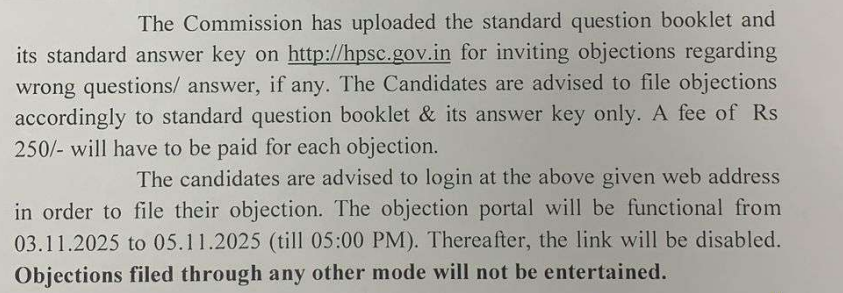
HPSC AE 2025 Answer Key has been out today i.e. November 03, 2025. The Last date of raise objection on answer key on November 05, 2025.
HPSC AE Admit Card 2025: The date has been released for admit card download.The HPSC Assistant Engineer (AE) Admit Card 2025 will be released online on the official website (hpsc.gov.in) on 28th October 2025. The exam is scheduled for 2nd November 2025. Candidates must use their registration number and date of birth to download the hall ticket from the “Admit Card” section of the HPSC website.
We have given here the details of the Admit card. Downloading the admit card is an easy step which an engineer does not need any help but there are certain things you should know we have provided in this article.
Exam Day Instruction
You should not forget to carry your admit card and with that one government-issued ID such as Aadhar card,Pan Card, Passport, PPP of Haryana
Downloading steps for HPSC AE Admit Card 2025
- Visit the official website: hpsc.gov.in
- Click on the “Admit Card” section on the homepage.
- Find the “HPSC Assistant Engineer Admit Card 2025” link and click it.
- Enter your registration number and date of birth.
- Submit the details to download your admit card.
- Print a copy to carry on exam day.
The admit card will contain your roll number, exam center, timing, and important instructions. It is mandatory to bring this along with a valid photo ID for entry to the exam hall.
Error in Admit Card?
Make sure to check all admit card details carefully, and contact HPSC promptly if you spot any errors
- Visit the HPSC official website: hpsc.gov.in
- Go to the Admit Card/Login section for the current recruitment.
- Find the link or button that says “Forgot Registration Number/Password” or similar.
- Enter details such as your registered email ID, mobile number, and/or date of birth as prompted.
- Submit your details; you will receive your registration number/password either on your registered email or as an SMS to your mobile number.
- Follow any further on-screen instructions to reset/set a new password if required.
If online retrieval doesn’t work, you should:
- Check your email inbox and SMS folder for previous communication from HPSC containing your registration details.
- Contact HPSC helpdesk or support (numbers/email IDs are given in the recruitment notification and on their website) for manual assistance.
Always keep your registration details and password saved securely for future reference.
Steps to Take:
- Contact HPSC Immediately:
Get in touch with the Haryana Public Service Commission (HPSC) through their official helpline, email, or contact numbers given on the website. - Provide Proof:
Prepare scanned or photocopies of your correct application details, ID proof (like Aadhaar, PAN, or any document you used for registration), and admit card showing the error. - Raise a Grievance:
Many commissions have a formal grievance redressal or correction process, often via an online form or dedicated email for exam-related queries. Check for any such links or instructions on the HPSC website. - Visit HPSC Office (if needed):
If the error is significant and cannot be resolved online (for example, major mistakes in your name or photo), consider visiting the HPSC office directly before the exam date. - Follow Up:
Always get an acknowledgment of your complaint—keep records of communication for future reference.
Do NOT
- Do not modify or overwrite the admit card on your own.
- Do not go to the exam center with significantly incorrect details without informing HPSC; entry may be denied.