

JKBOPEE B.Ed 2026 application form opened on March 11 and will continue till 24 March 2026
JKBOPEE B.Ed 2026 application form filling Steps, rewritten for easy understanding. I’ve structured it into logical phases based on the official instructions. Here Check Below JKBOPEE B.Ed Kashmir/Bed Special Education/ B.Ed Jammu 2026, online application form, application number, upload documents, make payment, and print application form – Full JKBOPEE Bed application form filling 2026 process
Step-By-Step Fill JKBOPEE B.Ed 2026 Online Application Form
Get ready to avoid delays during the JKBOPEE B.Ed 2026 application form filling.
Step-1: Visit the official JKBOPEE website at www.jkbopee.gov.in.
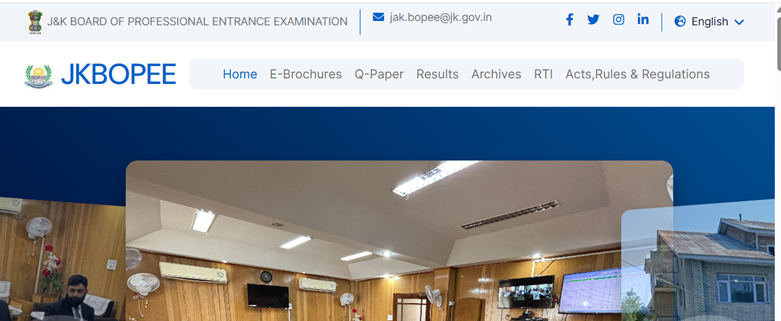
Step-2: Click “Click to Apply” under “Online Applications” for B.Ed. Kashmir/B.Ed Special Education/B.Ed Jammu. (it will activate Soon).
Step-3: Check the Registration Schedule for start date, last date for form submission, payment last date, and documents uploading last date. Fill your name and DOB in below given format only.
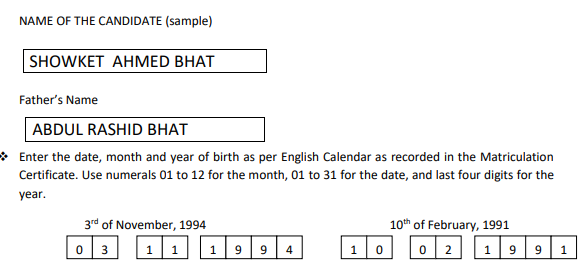
Step-4: Starts Correctly – Fill all form details accurately and upload your Passport-size Photograph, Signature, and Thumb Impression.
JKBOPEE B.Ed 2026 Photograph Size
| Image Type | Format | Size Range |
| Photograph | JPG/JPEG | 10-50 KB |
| Signature | JPG/JPEG | 10-50 KB |
| Thumb Impression | JPG/JPEG | 10-50 KB |
Instruction To Take JKBOPEE B.Ed 2026 Photograph
- Take the JKBOPEE B.Ed 2026 photograph with a plain light-colored background (white, light blue, or grey). Avoid dark walls, patterns, or shadows for clear facial recognition.
- Candidate Photograph must be their “Name” and “Date Of Birth”.
- Photograph file format must be in JPG/JPEG Only. (Not Any Other)
- Candidate Photograph not older than January 01, 2026.
- No Cap/Goggles Ok !!!
- Googles allowed on B.Ed 2026 Photo only if worn by doctor other wise not allowed.
Note – Candidate must keep it mind your photo not exceed given size limit other wise you photograph may not submit successfully. Next is upload you signature and thumb impression keep in same document size.
Step-5: Enter the Verification Code (captcha) and click “Submit”.
- If incomplete/invalid, fix errors. Review submitted details—registration details are non-editable after final submission (except via edit link before proceeding).
- To edit, click “Click Here to edit your registration details” (repeat as needed).
- If correct, click “Click Here”. Your application number (e.g., 31901800023) generates with “Application submitted Successfully” message and email confirmation.
- Proceed to payment now (click “Step 2-Click here to Make Payment”) or later.
Step-6: Make Payment for JKBOPEE B.Ed 2026 Online Application. Without Paying Fee Your Application Not be considered completely registered.
Follow these steps to complete you JKBOPEE B.Ed Fee Payment Step below:
- Click “Make Payment”. Enter Application No., Date of Birth, and Verification Code, then “Submit”.
- If correct, “Pay” button appears under “Make Payment Online”.
- Read instructions, check “I have read the Instructions”, and click “Proceed for Payment”.
- Pay via Debit Card, Credit Card, or Net Banking.
- On success, view Transaction Acknowledgement—note details or print.
- Proceed to documents (click “Step 3-Click here to Upload Document”) or later.
JKBOPEE B.Ed 2026 Application Fee
| Application Fee | |
| Application Fee Amount | Rs. 1200 (Rupees One Thousand Two Hundred Only) |
| Payment Mode | Online through Integrated Payment Gateway |
Step-7: Upload Documents for JKBOPEE B.Ed 2026 Registration. This is very important to upload in correct sequence your document during registration process. Follow steps below:
- Click “Upload Documents”. Enter Application No., Date of Birth, and Verification Code, then “Submit”.
- Select “Choose File” for each: Domicile Certificate, Date of Birth Certificate, Marks Sheet, Reserved Category Certificate (if applicable).
- Check bottom checkbox, enter Verification Code (captcha), and click “Upload”.
- If sizes/types correct, documents upload—view or delete via links to confirm.
- Close window once verified.
JKBOPEE B.Ed 2026 Documents Upload Size
| Document | Format |
| Domicile Certificate (J&K) / ST Certificate (Ladakh) | PDF 100-200 KB |
| Qualifying Exam Marks Certificate | PDF 100-200 KB |
| Matriculation Certificate (DOB) | PDF 100-200 KB |
| Category Certificate (if applicable) | PDF 100-200 KB |
Step-8: Now In Last Review your whole application form filling details and if all details are correct then click on the Print Application Form for JKBOPEE B.Ed 2026.
In Short Points:
- Click “Print Application Form”.
- Preview shows all details, including payment.
- Click “Print” at bottom and save the printed form safely for records.
JKBOPEE Bed Application Form 2026 For Already Applied Candidates: Check Status, Recover Application Number, or Edit
Use these if you’ve complete JKBOPEE B.Ed 2026 registration.
Check JKBOPEE Bed 2026 Application Status
- Click “Check Application Status”. Enter Application No., Date of Birth, Verification Code, and “Submit”.
- View: Application Status (BOPEE check, current status, payment), Documents Uploaded (status, view/upload links), and E-Receipt print link.
- Close browser after.
JKBOPEE Bed 2026: Forgot Application Number
If you forgot the JKBOPEE Bed 2026 registration number don’t worry, you can recover it. Follow steps below to recover.
- Click “Forgot Application No.”. Select Exam Type, enter Name, Father’s Name, Date of Birth, Verification Code, and “Submit”.
- Get your application number (e.g., 32001800023).
- Close browser after.
JKBOPEE 2026 Helpline Number
The applicants can also contact the Help Desk of I.T. Section of BOPEE during office
hours only on 191-2479157/0194-2433590 or email at helpdeskjakbopee@gmail.com /
coejakbopee@gmail.comfor any assistance/guidance in this regard on any working day within
the prescribed last date
FAQs – JKBOPEE Bed 2026 Application Form
Visit BOPEE Jammu/Srinagar offices with original documents. Book prior helpline appointment + Rs. 100 POS fee for assisted filling.
Rs. 1200 via Integrated Payment Gateway (Debit/Credit Card/Net Banking). Pay in Step 6: Make Payment after application number generation—without payment, online application form incomplete.
Click “Forgot Application No.”, select B.Ed type, enter Name+ Father’s Name+ DOB+ captcha. Get number instantly (e.g., 31901800023).
“Check Application Status” → Enter application number+DOB+captcha. Shows form check, payment status, documents uploaded, e-receipt print.
Wait for Registration Schedule on www.jkbopee.gov.in. Prepare photo/documents first to avoid delays.